Start a session first
Follow Quick start until captions are running. You’ll land on the captioning window — that’s where the overlay link lives.
Pick a look, then copy the overlay link
In the vMix / OBS overlay block, choose a style, layout, font, and size. The link updates itself as you change the pickers — you never type anything. When it looks right, click Copy.
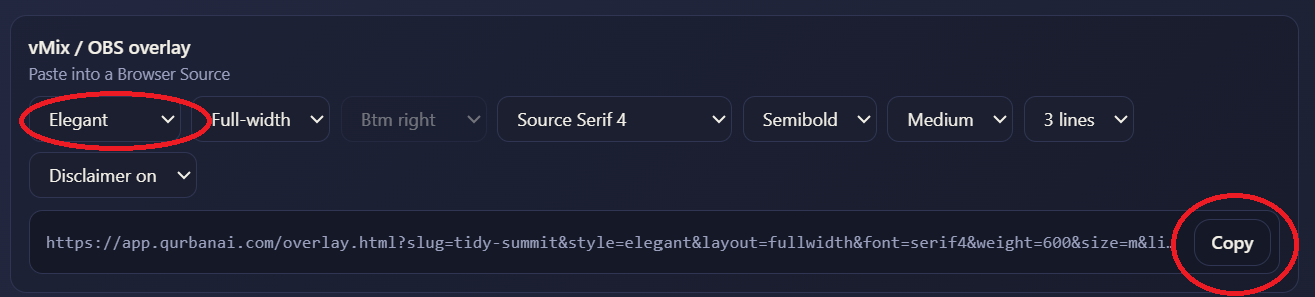
Options you can set here:
- Style — Elegant, Broadcast, Minimal, Classic, or Transparent.
- Layout — Full-width strip, or a Box you can anchor to a corner.
- Font, weight, size — match your service’s look.
- Lines — how many lines of caption stay on screen (2–4).
- Disclaimer — the small “AI-Generated” note, on or off.
Add a Browser Source in OBS or vMix
In your scene, add a new Browser source (OBS) or a Web Browser input (vMix). Paste the link you just copied into the URL field.
Use these settings
Set the source size and background so only the caption strip shows — the rest of the page is fully transparent.
The link already ends in &go=1, which tells the overlay to start straight away in vMix and OBS. Keep it on the end of the URL.
Position it in your scene
The overlay sits at the bottom of the frame by default. Drag or scale the source to line it up with your lower-third area. That’s it — captions now float over your stream and update live as the speaker talks.
Changing caption speed later? Do it from the captioning window — it applies instantly, with no need to re-link the Browser Source.